Save data from AJAX request in variable (jQuery)
Categories:
Mastering AJAX Data: Storing Responses in JavaScript Variables with jQuery

Learn how to effectively capture and store data returned from an AJAX request into JavaScript variables using jQuery, enabling dynamic content updates and further processing.
When working with web applications, fetching data asynchronously from a server is a common requirement. jQuery's AJAX functions provide a powerful and convenient way to do this. However, a frequent challenge for developers is understanding how to correctly store the data received from an AJAX call into a JavaScript variable for later use, especially given the asynchronous nature of these requests. This article will guide you through the process, covering common pitfalls and best practices.
Understanding Asynchronous Operations
The most crucial concept to grasp when dealing with AJAX is its asynchronous nature. When you make an AJAX request, your JavaScript code doesn't pause and wait for the server's response. Instead, it continues executing subsequent lines of code. The server's response arrives at some point in the future, triggering a 'callback' function that you define. This means you cannot simply assign the return value of an AJAX call directly to a variable outside its callback.
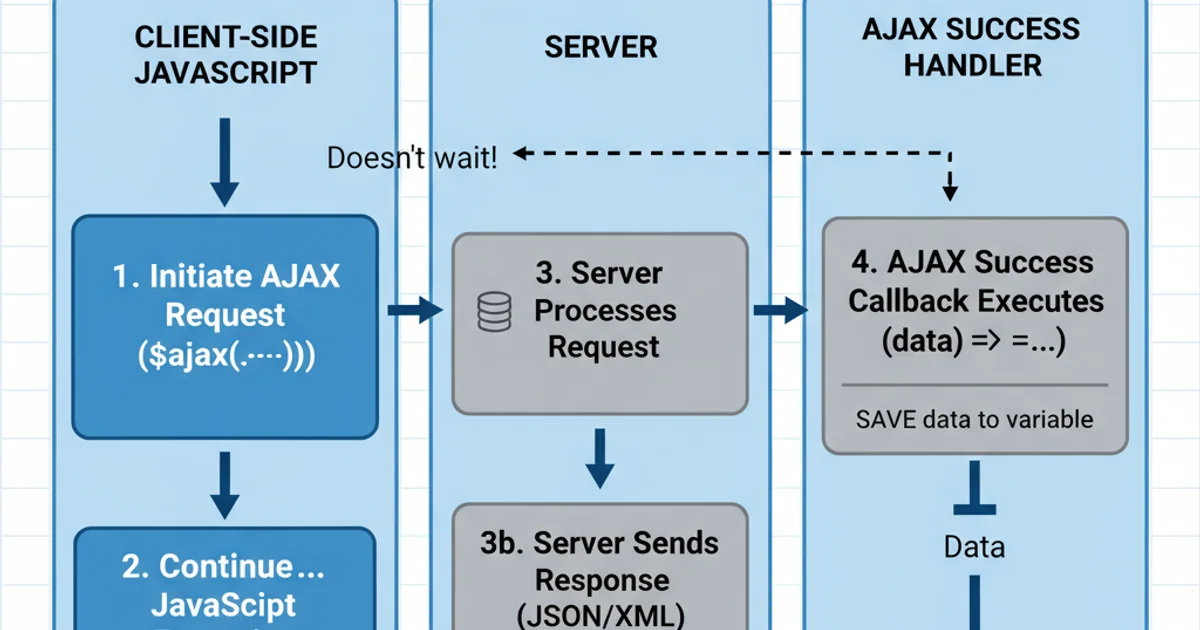
Asynchronous AJAX Request Flow
Storing AJAX Response Data
To correctly store data from an AJAX request, you must perform the assignment within the success callback function. This ensures that the variable is populated only after the data has been successfully received from the server. There are several ways to achieve this, depending on whether you need the data globally or within a specific scope.
error callback. This is crucial for debugging and providing a better user experience.Method 1: Using a Global Variable (Caution Advised)
While generally not recommended for complex applications due to potential naming conflicts and maintainability issues, using a global variable is the simplest way to make AJAX data accessible throughout your script. You declare a variable outside the AJAX call and assign the response to it within the success callback.
let globalData = null;

$.ajax({
    url: 'your_api_endpoint.php',
    method: 'GET',
    dataType: 'json',
    success: function(data) {
        globalData = data; // Assign data to the global variable
        console.log('Global data updated:', globalData);
        // You can now use globalData here or in functions called after this point
    },
    error: function(xhr, status, error) {
        console.error('AJAX Error:', status, error);
    }
});

// WARNING: globalData will likely be null here because AJAX is asynchronous
console.log('Attempting to access globalData immediately:', globalData);
Storing AJAX response in a global variable
Method 2: Passing Data to a Function (Recommended)
A more robust and maintainable approach is to pass the received data to another function. This keeps your code organized and avoids polluting the global scope. The function that processes the data should be called directly from within the success callback.
function processServerData(data) {
    console.log('Processing received data:', data);
    // Perform operations with 'data' here, e.g., update UI, store in local storage
    $('#output-div').text(JSON.stringify(data));
}

$.ajax({
    url: 'your_api_endpoint.php',
    method: 'GET',
    dataType: 'json',
    success: function(data) {
        processServerData(data); // Call the processing function with the data
    },
    error: function(xhr, status, error) {
        console.error('AJAX Error:', status, error);
    }
});

console.log('AJAX request initiated. Data will be processed when it arrives.');
Passing AJAX response to a dedicated function
Method 3: Using Promises (Modern Approach)
jQuery's AJAX methods return a Promise-like object (specifically, a jqXHR object which implements the Promise interface). This allows you to chain .done(), .fail(), and .always() methods, providing a cleaner way to handle asynchronous operations and their results. This is often preferred for better readability and error handling.
let promiseData = null;

$.ajax({
    url: 'your_api_endpoint.php',
    method: 'GET',
    dataType: 'json'
})
.done(function(data) {
    promiseData = data; // Store data
    console.log('Data received via Promise:', promiseData);
    // Further actions with promiseData
    $('#promise-output').text(JSON.stringify(promiseData));
})
.fail(function(xhr, status, error) {
    console.error('AJAX Error (Promise):', status, error);
})
.always(function() {
    console.log('AJAX request completed (Promise).');
});

// Again, promiseData will be null here initially
console.log('Attempting to access promiseData immediately:', promiseData);
Storing AJAX response using jQuery Promises
async/await with fetch API or wrapping jQuery AJAX calls in native Promises for a more modern JavaScript approach.Practical Steps for Implementation
Here's a summary of the recommended steps to effectively save data from an AJAX request:
1. Define Your AJAX Request
Use $.ajax() or shorthand methods like $.get(), $.post() to configure your request, specifying the URL, method, and expected data type.
2. Implement the Success Callback
Inside the success callback function, the received data will be available as an argument. This is the critical point where you can access and use the data.
3. Store or Process the Data
Within the success callback, assign the data to a variable (preferably local or passed to another function) or directly use it to update the DOM, perform calculations, etc.
4. Handle Errors
Always include an error callback to gracefully handle network issues, server errors, or invalid responses.
5. Avoid Immediate Access
Remember that any code outside the success callback that tries to access the AJAX data immediately after the request is initiated will likely find the variable unpopulated or null.